Showing posts with label google applications portal edtech integration literacy. Show all posts

Saturday, February 24, 2007

Ed Tech Guerrilla - Defining the Habitat

I just finished two presentations to educational groups using the "EdTech Guerrilla" philosophy I have blogged about previously in this space. (Picasa Web Album of my PowerPoint slides) I was surprized at how well they were received and even more surprized at how quickly these groups began the process of implementation of some of the tools.

On Friday (2/23/07) afternoon, I spoke to a small group of student teachers in Stanford University's STEP program. The initial contact for this presentation was through the Google Certified Teacher's group, which started last November. Google had their second Google Teacher Academy in New York last week. So, I have 50 new colleagues in the Google Certified Teacher group. Welcome, New York GCT's. The goal of the session was to help teachers create web pages, but I quickly expanded the goals for the session to include many of the Web 2.0 (School 2.0) tools many teachers are adopting. I wanted to start with Michael Wesch's video on Web 2.0, but alas, YouTube was blocked. I will learn my lesson and get a copy on my laptop that I can have for presentations.

The second group was a group of graduate students at Notre Dame de Namur University in Belmont, CA in a Educational Technology Leadership class. Mary Buckman, another GCT is the teacher of the course and invited me in to go through the presentation I previewed with her a few weeks back. The students in this class are all teachers, lead technology teachers or administrators. I was able to access YouTube and show the Wesch Video and it realy set everything up. The best part of this presentation wasn't my presentation, it was the dialogue that it started among the members of the class. I was psyched to see the synergy that was created between the members of the class.

The framework of the presentation came from an idea I had a few months ago and blogged on. In the early days of Apple Computer, the sales people and those who were Macintosh afficinados, were referred to as Apple Evangelists. I started seeing the 'Evangelist' label around with people in EdTech, primarily Will Richardson, who had an article about him in Teacher Magazine with the title, "The Blogvangelist." (I hope to meet Will this coming weekend at the CUE conference in Palm Springs!) I wanted description that evokes a little more action on the part of teachers and students. I started using the term 'Guerrilla' because I wanted to emphasize the idea that guerrilla fighters usually found weapons, or used unorthodox tactics to defeat a larger, better equipped foe. I decided to structure the presentation around this. I went to Wikipedia and pulled out the first paragraph of the definition of "guerrilla warfare."

Guerrilla warfare (also spelled guerilla) is a method of unconventional combat by which small groups of combatants attempt to use mobile and surprise tactics (ambushes, raids, etc) to defeat a foe, often a larger, less mobile, army. Typically the smaller guerrilla army will either use its defensive status to draw its opponent into terrain which is better suited to the former or take advantage of its greater mobility by conducting surprise attacks at vulnerable targets, often deep in enemy territory.

My goal was to try to frame the situation that exists today in schools in regards to Educational Technology and Information Literacy. In the paragraph above, the words that are colored red, better describe the students we work with on a daily basis: connected, mobile, agile, using surprize tactics, taking advantage of its greater mobility and to draw its opponent into their terrain. The terms that are in green, better describe the way teachers, administrators and schools deal with the same issues. Schools act like a larger, less mobile army that has vulnerable targets and forces students to work in enemy territory.

Part of understanding the issues that face teachers and students in the implementation of EdTech and information literacy skills is understanding the native habitat or environment the students, teachers and administrators live in. David Warlick makes the point in his presentations that we 'cut off the tentacles,' or the access to technology, of our students when they enter our classrooms. We have many district information technology departments blocking certain pages because of their 'potential' of misuse, eventhough there are plenty of valid educational uses of a particular web site or application. Classrooms with a single computer, firmly planted on the teacher's desk or located in such place that the students don't even think about using it. The habitat our students and teachers live in is foreign, sterile and disconnected to the outside world.

When I think of Guerrilla fighters, I usually think of someone who is an idealist. Firmly committed to a particular ideology and is willing to take on extraordinary measures to advance their philosophy. This is how I feel about the students in our schools and my commitment to information literacy. We must use any tool at our disposal to teach our students these skills. I know this may run counter to the philosophy of some, but doing nothing perpetuates an educational system that will fill non-existent factories.

Gingerly, stepping down off of the soap box... not to say I might just jump right back on it in a few days!


Friday, February 09, 2007

Information Literacy: The Points of the STAR

With the explosion of Web 2.0 and all of the media surrounding it, it is hard to escape hearing or seeing some example of its use in our daily lives. Along a somewhat parallel path has been a 'School 2.0' discussion that has traveled along the web. While there has not been an explosion of Web 2.0 tools used in schools, there are many instances where you can see these tools in use. Due to the role in society where schools are found, change in education is often a slow and often tedious process. In most cases, when you start talking about change in education, it is often some recycled program or idea that has been repackaged and sold as something new.

This is different. Information Literacy is on everone's mind now... and trying to define how that will look in schools is definitely starting to take shape. In my own mind, I want to define it for myself, so that I can accurately define and articulate it for other teachers and members of the community. So, this is just one way I started organizing things so that I can speak to teachers and members of the community and make sure I hit all the right 'talking points.'

So, here we go!

As I started looking at this I wanted to have a visual model where I could quickly draw in front of someone and have a few words connected to it that would organize my thoughts. Your own model may be completely different, but I am looking at this as a mini-graphic organizer.

I decided to use a 'star' as my organizing point. It's quick, easy to use and I can draw one with out much assistance, despite my lacking artistic skills. If you think of colors and light, the combination of all colors in light produces 'white light,' which is where all members of the school community need to be. Everyone needs to be able to see everything, it needs to be 'transparent.' Transparency, has become the new educational 'buzz word' of the day, taking over from 'ubuqitous.' In the model, where the white light is are: Students, Teachers, other Adults and Retention. The students, teachers and other adults are obvious, but the reason I added 'retention' was that I wanted to emphasize a 'shared set of skills and experiences' that will facilitate the conversation between all of the other three groups. The center of the star becomes the focal point of the five points that surround it. Each point taken separately sheds some light on the center of the star, but only when all five points of the star combine their light together do they become 'white light' or transparent.

So, what are the five points?

1) Tools / Applications: The tools of the Web 2.0 are now for the most part free. If you purchase a computer and have an Internet connection, most of what you want to do, you can find a tool for free that will allow you to do it. Some come connected with ads, others dont, but the point to be made here is that the 'point of entry' into the digital world has come very close to zero. It makes me understand Nicholas Negroponte even more. What tools... Open Office, Blogger, Google Docs and Spreadsheets, SketchUp, Google Earth, Picasa, Google Pages, Glifffy, wikis and the list could go on and on. The other issue surrounding 'point of entry' is the increasing power of cell phones becoming a computing tool. Everytime I do an SMS search infront of a new group of teachers, watching their eyes get really big and do a search with their own cell phone it is a very cool thing.

2) Relevance: As students and others move through there lives, there is always a desire to find ways to give meaning to the things that are part of our lives. Students are already using e-mail, text messaging, Instant Messaging, Social Networking sites (MySpace, Friendster), podcasts and online video (YouTube, Google Video). The use of Web 2.0 tools in education, which students are already using to connect to each other, gives them a level of comfort that is traditionally missing in most classrooms with desks in rows and a teacher standing at the front lecturing away.

3) Validation: Being able discern the difference between fact and fiction is an important skill in the lives of all adults today. But the even deeper importance comes from being able use information in a meaningful way. Search strategies, using the 'advanced search' functions of Google, the Way Back Machine and other search engines, allow students and others to find the history of different web pages, as well as sites linking to and sites being linked to.

4) Ethics: As part of the process of introducing a new 'Literacy' into schools, we need to understand that students do not understand many of the implications of their behavior in the connected society of today. This is something that many of us as adults have just learned over the past couple of years. Imagine turning the clock forward 10 years on the students we have today and the ability of a future spouse or employer performing a search on them and digging up some blog post or random reference on a web page that may not portray them in the most positive light. It has already been well documented where colleges and employers are using searches to determine admission and hiring practices. As part of the Global Communications curriulum, we included an entire unit on Digital Citizenship, much of which we used the material by Bailey and Ribble from Kansas State University.

5) Synthesis: Putting it all together is the key to all of this. Whether you call it remixing, synergy, mashup, sampling or something else, the goal of Web 2.0 and School 2.0 is to take the material available to students and synthesize it into something new and different. Once you have brought several ideas into a new form, you need to share that in some way, through a graphic, a podcast, blog post, video, etc. As students, and others, become more comfortable with this process of bringing together ideas from several different sources and sharing them out, it starts a conversation.

The conversation is what this is all about... We want students and their teachers and other adults in their lives to have a conversation. This conversation will take many forms, but it ultimately create situation where students will learn to work collaboratively with others towards a common goal and learn to teach themselves. This process will allow them to solve the issues that will undoubtedly face in their adult lives.

I once wrote an article about coaching, and the first line said, "Teachers and coaches are the biggest thieves known to mankind." I still believe this, but I need to refine it and say, "Teachers and Coaches are the biggest facilitators known to mankind." This is the role of teachers, where we become the facilitators of learning, not the source of it. In the past, teachers performed the remixing, mashup, sampling function for the students we teach, we did this for several reasons. First, it allowed us to have a deeper understanding of the curriculum we were teaching and improve our ability to relate the knowledge we had to the students. Secondly, we drew upon our own experiences in school, knowing that we didn't automatically 'get it' the first time the teacher introduced material and developed different ways to represent the same knowledge. Anyone that has been a teacher more than a few minutes has heard the phrase that we are moving from being "the sage on the stage, to the guide on the side." It is now time to really test all of that out.

In developing all of this I have taken and remixed and mashed up all of the things I have read and experienced over the last 2 years from: Alan November, Will Richardson, David Warlick, Miguel Guhlin, Wesley Fryer, Chris Walsh, Mike Lawrence, the Google Teacher's Academy, Vicki Davis, David Pogue, Mark Wagner, Kathleen Ferenz and a countless band of others that I read and interact with. I have not met all of these people face to face, but that is the strength of the new literacy, the ability to have the conversation, regardless of time or location.

So, to finish in the words of Dennis Miller.... ' of course I could be wrong.'

Thursday, November 23, 2006

Google Student Desktop


In the past few weeks since the Google Teacher's Academy, I have been playing around with many of the Google tools and looking for ways to integrate them into the day to day life of teachers and students. The applications they showed us during the day we spent at Google: SketchUp, Blogger, Picasa, Calendar, Docs and Spreadsheets, Groups, Reader and Earth, are all very cool and have many uses in education, but there was something missing. The part that was missing for me was the way to have all of these tools available at my or my students fingertips at the same time. Google Personalized Home, has the ability to be an 'Internet portal' for teachers and students.

If you have a Gmail account, you can create your own personalized home page. You can then add widgets, some created by Google and some by third parties, to your home page. Some of the third party 'widgets' are: del.icio.us bookmarksThis allows you to create a 'dashboard' of services that you use on a daily basis and best of all, these services are available to you anyplace you can get to a computer with an Internet connection. Imagine you and your students having access to a wealth of tools at any computer, anyplace in the world.


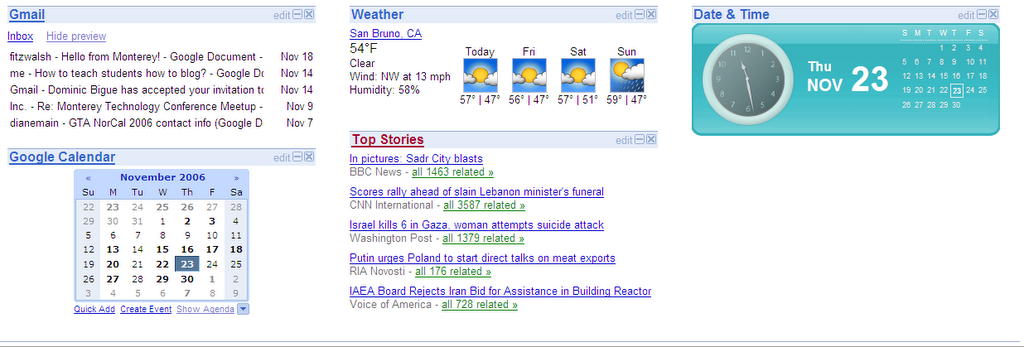
When you start, you are given a page that has the Google search bar on the top third of the page and the bottom two-thirds of the page is divided into three columns, where your widgets can be loaded into and saved. If you have more widgets than your main page can hold, you can create additional pages and you can navigate between your pages using tabs across the top of the three columns.

(Screen shot of the tabs on my personalized home page)


(The screen shot below is of the three columns on my home page.)


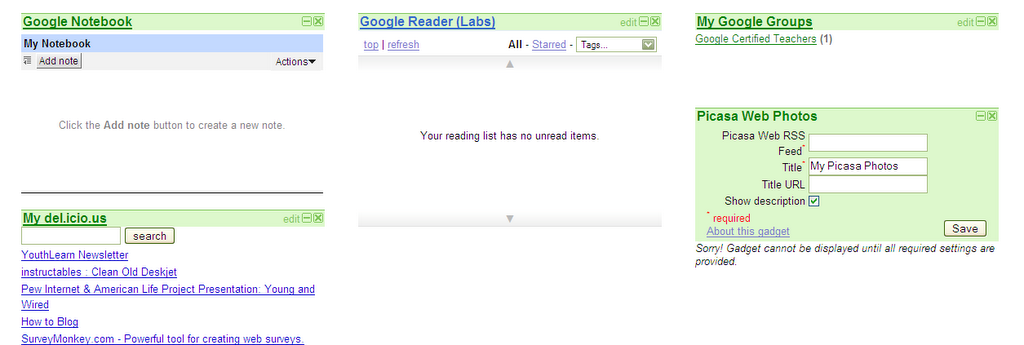
(This is the screen shot of my 'Google Apps' page on my personalized home page. I have a del.icio.us widget for all of the pages I have bookmarked.)


Currently, there are certain Google tools that do not have 'widgets' to be included in the Personal Home page, but I would suspect that these items would be included soon. The two that would be the most useful to me would be Blogger and Docs and Spreadsheets. (As of 11/23 - The Docs and Spreadsheets widget was added after I took the screenshot above.)

Give it a try... I think you'll be impressed.