Sunday, May 27, 2007

Expectations in a Digital Age


Transparency and accountability: Isn't this what we want and expect from our students? Isn't what we should expect from our teachers as well?

Many years ago, when I was a younger teacher, I remember seeing a video that a student had shot surreptitiously during an Advanced Placement American Government final exam. On this video tape, I was able to witness a student 'body block' the teacher, other students tossing stacks of paper out the window and general mayhem throughout the 15-20 minute video. I discovered a few weeks later that the video tape found its way into the hands of the principal. This teacher quickly was transferred to another school, but to my amazement, this teacher continued to teach for several years after this incident. I understand the laws in California regarding 'tenure' or permanent status, I think they were needed in the past. The low pay of teachers and the desire to allow teachers some level of autonomy in the classroom, tenure laws were necessary to protect teachers from over zealous idealogues who permeated school boards. The pendulum has swung so far to the way of teacher protection that bad teachers can't be removed.

Now, I am asking the question, how do we fix the situation? I have had as a quote on this blog, "There is a big difference between teaching thirty years and teaching one year thirty times," but how do we balance the situation to build schools that rewards good teaching and either remediates or removes teachers who can't get the job done?

What are the professional expectations we have of teachers? Especially, what are the expectations of teachers to incorporate 21st Century technologies into their teaching repertoire? There are several issues that make this difficult to achieve, including: lack of quality professional development, availability of tools, etc., but we have to move forward and who is going to make sure teachers meet these standards? Administrators? Most administrators know even less about technology integration than teachers do and have absolutely no frame of reference to evaluate teachers in this area. The one other issue we haven't mentioned is the fact that teachers do have an ego. It may not be as large as a professional athlete's, but they do not want to be corrected by one of their students, under any circumstances.

So, we are in a time warp... We have students that are consuming the media as fast as it can be produced, teachers unwilling to integrate technologies that will allow their students to become self-initiated learners and administrators who believe a PowerPoint presentation is the pinnacle of technology integration. (Don't laugh, I have had administrators tell me that they beleive that a PowerPoint is an advanced use of technology.)

Sorry for the rant... but if we are going to move forward in education in this country, we need to look at information differently. There is a difference between possessing information and the ability to manipulate the information students have access to. We are still teaching students to possess information, instead of being able to quickly manipulate it for their benefit.

Friday, May 11, 2007

Tentacles: Real and imagined....

First of all... It's been almost two weeks since my last post on this space. Why? Well, the Global Communications Grant progress report was due to the CDE on May 7 and my writing resources needed to be focused there instead of here. I really do miss the connections I make in my own mind here, infront of the legions of readers of this blog that I can count on my hands.

Let's talk about tentacles...


When we, as teachers, begin the process of looking at information literacy as a study unto itself and incorporating it into our curriculum, there are several places we look for items to illustrate the need for these skills. One of these places is a site of the Pacific Northwest Tree Octupus. Now, looking at the title, an average individual would think of this site as bogus, which it is. Although, I would challenge you and your students to take a look at this site. The site has a high quality look and feel to it and the average 13-14 year old might look at it and validate it on looks alone. Students, like many of us, judge the book by its cover! This really illustrates the need for information literacy(IL) and digital citizenship (DC) instruction in our schools. The road block? We need more teachers and administrators to include IL and DC as as part of the greater definition of literacy we want our students to achieve. How far do the fabled tentacles of the Pacific Northwest Tree Octopus extend into our schools?

Students, the Digital Natives of our culture; are wired, unwired and ultra-mobile. It is not uncommon to find a high school student with the TV on, listening to music from iTunes on their computer, with three or four browser windows open and at the same time engaging in a few instant messages sessions and a cell phone call with one of their friends. The students we teach don't just use technology, they devour it. Last November, I was at the Monterey CLMS conference and went to the keynote presentation given by David Warlick, where he likened students use of technology to the tentacles of an octopus, far reaching and able to bring in many different resources at the same time. His talk quickly turned to the point that when students enter schools, we cut off the tentacles they use to pull in all of the information they use in their personal lives. What would happen to an octopus if we cut off all of its tentacles? It would more than likely die because it would be unable to feed and defend itself. Are we creating a situation where students can't feed and defend themselves?

What do they need to eat? Information, but not just any information, they need the information that is going to prepare them for the challenges of their adult lives. In the wild, animals quickly learn who their allies and enemies are and how to best provide for their survival. Students need to learn these same skills in the world that they encounter in their everyday lives.

How do students know what is valid and what is bogus? Do we teach them that? How much of what students consume as patrons of the Internet is valid? Are there opinions, or more accurately, different interpretations on the same set of facts that are available on the Internet? These are all reasons why information literacy and digital citizenship are so important and must be part of what we consider the new definition of what it means to be literate!

What do we need to do?

- Develop ways for students to build their own filtering system for Internet resources
** I am currently working on a criteria to validate Internet resources. What do you think should be involved. Drop me a note! I would like to have a single page guide that would assist students in validating Internet resources.

- Talk to teachers and administrators and get them to include information literacy and digital citizenship skills into the curriculum. I know everyone has more content than they can possibly teach, but these skills are the tools that will 'unlock' all of the information that will allow students to teach themselves.

- Read more: Parents, teachers, administrators and students. The more people read, regardless of the content, the more they develop their skills for identifying nuances in the text, discovering the 'under the surface' material in a passage and in turn become better consumers of the media.

Friday, April 27, 2007

RSS: If it's so simple...


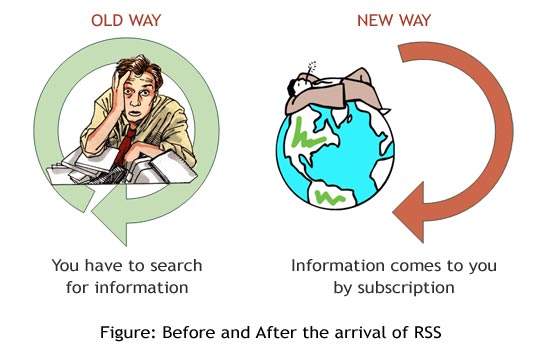
RSS (Rich Site Summary or Really Simple Syndication) made a huge difference in the way I consume the media available to me on the Internet. I opened my 'bloglines' account during an Alan November lecture at the San Mateo County Office of Education and I haven't looked back. I started reading blogs and subscribing to many Educational Technology blogs that were available at the time. There are many, many more these days, including this one, to choose from. I currently subscribe approximately 20 blogs and I can usually scan through the feeds on a daily basis. There are times I let the number of posts build up to over 150. When I tell people that, I can see their eyes roll in disbelief that I have the time to read that much. Well, the simple fact is that I don't read everything I subscribe to. I scan the feeds through my reader (I switched over to Google Reader about 6 months ago) and open the articles that catch my eye and read the entire article.

Here's the rub to me... When you subscribe to a feed from a blog, web site or even a wiki now, it sends you the information when the site changes. So, when something changes, my reader sends it to me. You never have to go back to check up on your favorite website. Setting up the newsreader is easy, regardless of the reader you select. Why aren't more teachers and students using news readers? Do we need to get the word out? How can we get more of them using RSS?
Below is a short film I saw on RSS that explains it pretty well.

There are two types of Internet users, those that use RSS and those that don't. This video is for the people who could save time using RSS, but don't know where to start.

If you are looking for something that is printed... Will Richardson has a great RSS Guide on his site that shows how to start a Bloglines account and subscribe to feeds. Will also has a series of teacher responses to a post he did about a year ago about weblogs. Will also did a great presentation this year at CUE, about the use of blogs in class. You can find his lecture outline and links here!

So, what are some things you could do as a teacher using RSS to make your life easier?

1) Have your students use blogs instead of hand written journals. Students can add images and embed video to make their journals come to life. As the teacher, you subscribe to their blogs and get their assignments sent to you! You could do this even cooler with a 'PageFlakes' page.

2) Have a wiki (PBWiki, Wetpaint, Wikispaces) for class projects and subscribe to the RSS feed. Anytime a student contributes to the page, you will see what they have done and can give them a participation grade them for it. Here are some examples of classroom wiki's: Understanding Film, SMCROP Cisco and CHS Government.

3) Have the students create their own readers in Google Reader, Bloglines or PageFlakes. When you find interesting articles, share them back with the kids. I can remember the times that I found an article in the newspaper that I felt was particularly topical for my class and having to cut the article out and run down to the copy room to get enough copies for the class to read and discuss in class. You could even set this up as a weekly assignment, where you share 6-10 articles a week with your students and they become the writing prompts for their journals. (on their Blogs!)

4) Digital Peer Editing. I have seen many teachers use the peer editing technique to give their students feed back from someone other than the teacher before the assignment is turned into the teacher. Creating blog posts and assigning students to read each others blogs and comment on them is another way in which students can receive authentic feedback from their peers prior to turning something into their teacher. If students know that their work will be seen by many pairs of eyes, their level of motivation toward creating quality content will increase.

Coming full circle... Why don't more teachers use RSS? Is it because they don't know about it? Is there a techno-phobia that sets in with something new? Is it because teachers don't see the value in it? I really don't know, but if teachers gave it a chance, they would find out how 'really simple' it is.

Saturday, April 21, 2007

Google Office: Getting closer and closer


Over the past few months, I have written several blog posts about Google and Google Apps for your Domain. After attending the Google Teacher's Academy in November, I have been working with different groups to use these tools with their classes. The past week has seen several events come to pass that will finish the "Google Office Suite" and the next few months will see the integration of all of these tools into a single sign-on service giving most students and teachers access to a very powerful set of tools they can use to create, manage and share their data with other students and teachers. This facilitates collaboration in real-time with anyone, but most particularly with teachers and students.

So, what has happened this week...

1) Google announced that they will have a presentation tool (like PowerPoint) that will become part of the Google Docs and Spreadsheets package. Eric Schmidt, the Google CEO demonstrated at the beginning of his talk at the Web 2.0 conference in San Francisco this week. There were other interesting tidbits from the 35 minute interview, including what he sees as Google's direction and which new 'spaces' Google will move into. (See Video Below)


2) Google announced that they are adding charts to the Spreadsheets package. This was one of the big missing pieces to the puzzle for most business users and will facilitate students learning how to use data more effectively in supporting their point of view. The students in our Global Communications course have just finished a project where they had to survey others, collect and interpret the data they collected. They could write the paper using Google Docs, but they had to use Excel to enter their data and create charts. This can all be done in one system now and have the files linked together. (e.g.: embedding a chart created from a Google Spreadsheet directly into a Google Document.) Google is spending time integrating all of the tools together, which I think is crucial to making them more popular. A new video shows Google's efforts in this area. Rajen Sheth, the Project Manager for the Google Apps, reviews the major features and how the tools integrate with each other.


3) Google announced the acquistion of Marratech, a company that produces an online project management system. The management system has embedded chat and video conferencing features built in. There is even an online 'whiteboard' system for online collaboration. Look for this to be part of the Google Apps for your Domain soon!

So, the trick that Google needs to pull of now is getting everything to work together. I believe that one of Google's chief missions is to pull everything together in this way an provide a package for businesses and schools. But more than a one size fits all approach, the goal should be create a system where businesses and schools can tailor the tools their employees and/or students have access to. Rajen Sheth, outlines part of this in the video above, but I also think they need to create additional API's for the tools that are not currently part of Google Apps and allow groups or individual users to place them on their 'Personalized Home Page' or "Google Apps Home Page." Among the tools I feel should be part of the Google Apps are Blogger and the revised version of JotSpot wiki tool. With the inclusion of these two tools, the Google Apps will create a powerful, full service online office suite / publishing platform.

What does this mean for education? It means that in the near future, all students will have access to a set of very powerful tools for productivity, publishing and collaboration. Each student will have access to these tools from any Internet accessible computer, regardless of platform . (Windows, Apple, Linux) It is another way in which the 'Altruistic Excuse' becomes moot!

Get ready... because things are going to get a little crazy! You don't want to be left behind, or do you?

Saturday, April 14, 2007

Solving the Altruistic Excuse

In my position as a Technology Coordinator for a school and school district, it has been my job to advocate for the use of technology in the classroom as a way to bring the world to the students we teach. I know I am not unlike others in my position, where there is resistance to many initiatives from teachers and administrators. Typically, administrative resistance comes from financial concerns and lack of awareness. When dealing with teachers, the resistance comes from perceived cost to benefit ratios and what I call, "The Altruistic Excuse." The Altruistic Excuse is when teachers tell me that they cannot use technology in their classrooms because not all of their students have access to computers and the Internet in their homes. "Why should I assign something that some of my students cannot complete, or it would cause a great hardship for them to complete." (e.g.: going to the library or a friends home, etc.) But, just as the phrase says, teachers think they are being altruistic when they 'protect' some students by not assigning assignments that use technologies that they may not have access to. To me, this is nothing more than an excuse by teachers to keep from having to learn how to use the technology themselves. (Digital Natives / Digital Immigrants / Digital Refugees)

In some ways, this has been a focus of my work over the past two years. I have looked for solutions that will eliminate the Altruistic Excuse. The Digital Bridge and Global Communications programs we have created have been in part, a response to the Altruistic Excuse. Finding ways to connect teachers and students together in new and different ways and increase the level of collaboration and spark the conversations that create a richness and depth in education have been the goals.

The reason I write this now, is that the OLPC has finally been shipped! It is the 'missing link' in solving the Altruistic Excuse. I became very interested in the project when it was launched because I saw the potential it could have on education, world wide. I started reading many of the previous writings of the project leader, Nicholas Negroponte. Negroponte, has been on the media scene for years writing articles for WIRED Magazine in the early 1990's, which became a book, 'Being Digital' and having been the director of the MIT Media Lab for the previous 30 +/- years. Negroponte's presentation at last year's TED conference, outlining the OLPC project really brought many issues into focus for me.

So, time to put the pressure on those in the educational community, teachers and administrators, to bring complete and open access to media. Now, how we teach students how to interact with the media they have access to is a completely different blog post!

Remember the mantra... "There is a big difference between teaching thirty years and teaching one year, thirty times."

Let me know what you think!

Friday, April 06, 2007

What do we want them to do?

The U.S. Department of Education has confirmed what I believe most teachers already knew, that programmed learning systems have little effect on student achievement. Now, there are those in the media and others that believe this is an indictment of the use of technology in education. To me it is the rallying cry that we need to change the types of technology we invest in for schools. I teach at a school that has a programmed learning system, there are those teachers that really like using it and others that think it is worthless. I find myself in between, seeing the advantages of having a system as a supplement to the traditional classroom instruction, but placing too much emphasis on the application to teach skills is misguided. The biggest issue I have with these types of systems is the cost. The system we use at our school intitally cost well over $100,000. There are also maintenance fees approching $10,000 a year. Training for your staff on how to implement the system in your school also has an additional cost. To me that is a waste! Over $100,000 to put in an old fashioned 'drill and kill' tutorial system. Outspending isn't the way to go! We need to out teach... but we need to teach teachers and students how to teach themselves! (Thanks to Kathy Sierra's Blog for the graphic above!)

So, we need to do more things to provide professional development to teachers to create activities that provide skills for students that utilize the tools they are already using. (Blogs, message boards, video sites, podcasts, etc.) As part of this process, we also need to provide lessons to teach students digital citizenship and ethics. As we engage students into the process, we begin to introduce the skills we want students to learn when using technoogy and the Internet as an educational asset.

This weekend there were two video's I saw online that introduce some of the issues that deal with these issues. The first is a video that describes how students are already engaged in using the media that is available to them to communicate and exchange information. I saw it posted on the School 2.0 site by Susan Brooks-Young, but it was produced by the MacArthur Foundation.


The second video I saw this weekend came from the AdCouncil and their Online Sexual Exploitation project. It is a good analogy of what really happens when you post personalized information online. The images really bring the point home for most kids.


So, what do you think... Should we spend more money on 'drill and kill' or do something that allows students to think, create and take responsibility for their own learning?

Any comments out there?

Tuesday, April 03, 2007

School 2.0: I think its going to work this time.

Over the past few months, there have been several instances, where images and examples have permeated the educational community dealing with Web 2.0 technologies. There has been a core group of educators that have espoused Web 2.0 technologies and their use in education. Alan November, Will Richardson and David Warlick have all come at this issue from many different angles. While there have been many others around the conversation, there hasn't been a critical mass of people and technologies converging to make School 2.0 a reality.

There have been some educational communities that have been able to create some great work in the educational field, but none of them have been able to gain enough traction to bring enough people into the conversation to make them viable agents of change. The educational environment has always been the last to integrate new technologies and strategies into the mainstream. There are a variety of reasons for this, but it really comes down to a lack of money, lack of insightful management and little or no motivation. There have been several technologies over the past year that have brought smaller groups of change agents together and connected them in communities. I blogged last week on TeacherTube and NextVista, but more than that the free and open access to wiki tools, like: PBWiki, Wetpaint and Wikispaces. Steve Hargadon has been one that has spearheaded the 'School 2.0' movement through first; through a Google Group, which I joined, but found that there was little or no activity, and now through a social networking site on Ning.

Why do I think that this attempt of a School 2.0 community will be sucessful? For a few reasons: First, there are enough of the people at the grassroots level of EdTech, who are involved, including: David Warlick, Lucy Gray, Sheryl Nussbaum-Beach, Miguel Guhlin, Susan Brooks-Young, Chris Walsh and Mark Wagner. Secondly, there is enough crossover into other projects teachers and educators are working on that 'School 2.0' becomes a natural common space for different projects. Third, the social networking tools are getting better and the cost of entry for teachers and students is close to $0.

The video below is one that is posted on the Ning, School 2.0 site. It is a remix of Karl Fisch's 'Did You Know' slideshow, but uses some different images and focuses in on changing the educational process. More media like this will bring more attention to changing the current system and School 2.0 will be at the right place at the right time. The attention is coming... The University of Michigan is now offering a MA in Social Computing.