Friday, October 27, 2006

Google Teacher Academy - Part II


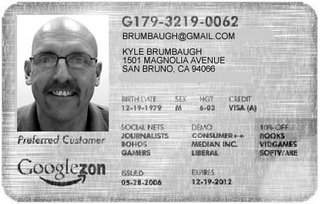
I'm in! I received word late in the day on Thursday, that I was selected to take part in the Google Teachers Academy. After the training, participants will become 'Google Certified Teachers.' The 50 people chosen will attend an all day seminar at the Google Campus in Mountain View, CA on November 7, 2006. Now, when I say all day... I mean, ALL DAY. The e-mail I received said they would feed us Breakfast, Lunch and DINNER! All of this is part of the new 'Google for Educators' site the company has just unveiled.

I'll post plenty of information about the day afterwards. I am totally psyched and ready to go!

Saturday, October 21, 2006

Google School: Making a difference around the world.


I wondered how long it was going to take Google to step into the educational arena. It seemed logical, like most large tech companies, Google needed to reach out to the educational community in some way to build consumer/user loyalty for their product.

The first part of the process is to create a 'Google for Educators' web site. The site has links to all of their educational tools, including Blogger, Calendar, SketchUp and their new Docs and Spreadsheets. Included are some sample lesson plans that teachers can use with their classes. I think this is the beginning of what Google has planned to dive head first into the educational arena.


The second project Google is working on is the 'Google Teacher Academy,' which is a collaborative effort with WestEd. Google will be holding an initial training day at their Mountain View campus on November 7, 2006. The training will create 'Google Certified Teachers,' who will lead training sessions for other teachers in how to use Google tools. The application was due on October 22, 2006 and included two 50-word answers to "Why should you be a 'Google' teacher?" and "Tell us about one rewarding teaching experience?" as well as a 1-minute maximum video dealing with motivation or K-12 education. I was able to get my application in under the wire. The space is limited to 50 participants and when I applied, my confirmation number was 1107. More to follow if I am chosen to be one of the 'Google Certified Teachers.' Here's a link to my 1-minute movie.


The 'Infinite Thinking Machine' is a blog where the people from WestEd and Google will be posting best practices of teachers using Google Tools. There are also short video's on the site showing some of the Google tools being used in the classroom by students. The video's are hosted by Chris Walsh of WestEd, some of us will remember Chris from his work around San Mateo County. The first ITM video has students using 'Google Earth' explore Hart Island in New York and information on the Google Educators web site. There is also a clip with Hall Davidson talking about California Student Multimedia Festival. The second ITM video deals with writing on the web with Mike Lawrence, the Executive Director of Computer Using Educators (CUE) and has students using 'Google Earth' to plot the routes they walk to school and finding the distance. There is also a section on using the Big 6 Information strategies.


Google has also launched their 'Google Literacy Project' web site. This is a international web site that is a joint venture between Google, LitCam and UNESCO (United Nations Scientific, Educational and Cultural Organization). There are a number of videos on literacy on the site from locations around the world. I think we will be using some of the videos on the site in our Global Communications course.

If you have any questions, please feel free to e-mail me!

Friday, October 13, 2006

Possums, Tails and Literacy


The last few weeks has had more than its share of ups and downs to last awhile, therefore the blogging was put on the back burner. Now, that everything has quieted down a little I can get back to pushing the literacy agenda again. In my best southern accent I want to say, "Friends, I have a word for you today. That word is 'Literacy.' It's all about giving to our students... giving our students the gift of life long literacy."

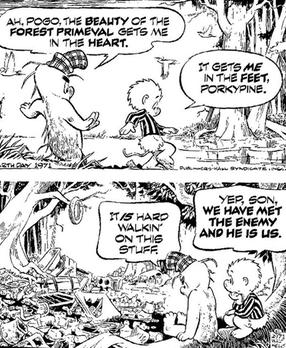
Over the past few months, I have written about integrating technology, but in some of the things I have read over the past few weeks, I have been wrong about this. Integrating technology isn't something we should think of as separate from literacy as a whole, it is an integral part of what will be necessary to be considered literate in the world our students will spend their adult life in. So, to quote the Pogo cartoonist, Walt Kelly, "We have met the enemy and he is us."


To clarify what I mean, I think that teachers and the educational establishment have been barriers to the 'new literacy' in our schools. The skills that we think constitute 'information literacy' in the past truly support and enhance what we think of as 'traditional literacy' skills. Currently, we think of literacy as 'possessing' a certain number of facts and the ability to apply them to situations that present themselves to us in our everyday life. In the society our students will live in, it will be impossible for them to 'possess' all of the knowledge that will be necessary to work in the society of the future. The current definition of 'Information Literacy' includes: defining, locating, selecting/analyzing and organizing/synthesizing. It is these last two sets of skills that are the most important to our students.

The way schools have been organized over the last 100 years have been based on the Industrial Manufacturing model, with students traveling from class to class, like an assembly line, to have 4 quarts of History or English poured into their bodies. Henry Ford would be so proud! Educational pundits have recoginized that this model has been flawed when they use analogies that the teacher needs to stop being the 'Sage on the Stage' and move over an become the 'Guide on the side.' So, what will it take for us to move toward a model like this?

Like all 'new' ideas, especially those in education, they usually come into being from some type of business model. And 'New Literacy' models come from business as well. A new theory of collective intelligence and collaborative creation of knowledge comes from a book called, 'The Long Tail.' Want to see a little of what is meant by the 'Long Tail,' check out this video on the Long Tail Blog. David Warlick, one of the most respected Information Literacy authorities (lecturer, blogger, author) wrote about his interpretations of the Long Tail on his blog.

Next Steps:
1) Sign up for a Bloglines or Google Reader account. There is a video on the Google Reader site that will teach you about adding feeds to your reader.

2) Subscribe to 4 RSS feeds and read them at least every other day. Make sure these are feeds you are interested in.

3) Create a Blogger account and write a blog. Your audience could be for you, to get your ideas on paper. Your friends, to discuss the latest ideas, books, the weather, etc. Your class, to identify blog postings or other articles you have found on the Internet that will bring greater definition to what you are teaching in class.

If you need help. You can always contact me... I will come out to help. There have been 5 people that have contacted me about some of the things I have written here and I have either personally connected with everyone, either in person or e-mail, and sent links or helped them set up an account. There is one person I need to get back to and make sure they are ready to go. One of the teachers at Capuchino is currently on leave and living in Hong Kong, before he left he asked me how to set up a mailing list so he could keep in touch with all of the students that want to stay connected to him... I told him to start a blog. Check out the Hong Kong Chronicles.....

Happy Blogging and e-mail me when you create your blog so I can subscribe.

Sunday, September 17, 2006

Digital Bridge: Bringing it all together... Finally


Over the past few years, the issue of the 'Digital Divide' has bothered me. I knew that teaching students how use technology as a tool to increase their awareness and take their learning to new places was something I wanted every student to have the chance to experience. The 'Digital Divide' took on many forms, economic, social, gender based or on municipal infrastructure. While most of the United States had the ability to access the Internet with a broadband connection starting in the late 1990's, it hasn't been since the last year or so that we have seen that most students we teach have access to computers in the home and have that computer connected to the Internet. A recent Wired Magazine article states that there has been significant progress in the issues surrounding the 'Digital Divide,' but that there are still issues that prevent many students from accessing the Internet from home. Internationally, there have been several programs that have addressed this issue for students in third world countries, the most notable being the $100 laptop program from MIT's media lab and its director, Nicholas Negroponte. (Negroponte Speech at 2006 TED Conference - approx. 18 Minutes)

In our area the issues in providing access to computers, software and Internet access for our students has been mostly economic. Students unable to purchase computers, software or get themselves to the local Public Library (All San Mateo County Public Libraries have free Wi-fi access.) to use a computer, were left out of the online world.

If they could get a computer in their home, either buying a cheap computer or getting a free computer from a friend or neighbor, the issues of software to use on the computer and access to the Internet still remained. As part of the Global Communications grant, we were able to pick up about 35 or so computers from ROP that we can 'give' to students to take home. One part of the 'Digital Divide' has been bridged... But the issue of software and Internet access still remain, or do they?

Over the past two and a half years, there has been an explosion of 'free' software out on the Internet, which allows students to download software onto their computer that is compatible with most, if not all of the software applications we use on campus. (Microsoft Office, etc.) Many of these applications are categorized as Web 2.0 tools. A fellow educational technology specialist in Texas listed many of these applications on one of his blog posts. I mentioned to him a few that he left off of his list and he blogged it again giving me credit... (I'm getting spammed to teachers in Texas and around the country... isn't the blogging thing a little cool?)


There have been a few 'municipal wi-fi projects' that have launched in the past two years, most notably the Google Network in Mountain View, the Earthlink Network in San Francisco. Events over the last few weeks have made it possible for all students to be able to access the Internet if they live anywhere in San Mateo or Santa Clara Counties or in the cities of Fremont and Newark. Joint Ventures Silicon Valley has just created a partnership with Cisco Systems and a few other companies to cover all of these cities in an open wireless network. This will allow anyone with a laptop in an open area within the city limits of these towns to access the Internet for free. There will also be adapters available to bring this access into your home. Now, the access is ad supported and will be slow in some locations at some times during the day, but it is the complete bridging of the 'Digital Divide' for the students we teach.

I am just psyched that we will have the ability to give every student we teach access to a computer, a wealth of applications and to the Internet. I can't wait to pull it all together. If you know of a student that does not have a computer and needs access to one, please let me know!

Saturday, September 09, 2006

Web 2.0 - School 2.0: Getting Jazzed about what is going on!


First of all... Thanks for the great response to the latest blog entry. I received several responses from teachers and administrators (one Assistant Principal and one Principal) around the district and I feel like there are quite a few opportunities for teachers to collaborate that go beyond what we have seen in previous years.

Here's a little of what I think can and will happen... I heard from a few of the District librarians that they felt they wanted to move forward in integrating technologies into what they do on a daily basis. I suggested to them that they create their own 'District Library' wiki, where they could post all of the materials that are common to all of the Libraries in the District and then use their own school library sites as the place where they could talk about the special collections and events happening at their own Library. I defintely want to pursue this project with them and will be asking to come to their next council meeting. (I'll have a separate post on Libraries in the next few days!) Educational Uses of Wiki's


A second potential collaboration happened when I received an e-mail from a teacher at Mills, who had been doing some things on the 'Read/Write Web' with PB wiki, a free online wiki tool. I took a look at what the teacher had posted and found there were quite a few links to pages that other teachers might find useful. I used PB Wiki with my Computer Systems Design class last year when they did their 'Build Your Own Computer' project, the culminating activity of the class. PB Wiki is a cool tool, but I found something a little better, called Wetpaint. I also heard from a teacher at San Mateo in the same discipline, who wanted to get started with some of these tools, but didn't know where to start. I e-mailed back and said that I would be more than happy to come by and help set up some tools to publish out on the web, but I also sent the links to the pages that the teacher from Mills had sent me. This is the true collaboration that Tim Berners-Lee envisioned when he developed what we call the 'World Wide Web' in 1989.

I went over to Mills this week and met with the science teacher to set up a Wetpaint wiki. When I arrived, he already had his site running and had plenty of ideas on how to use this with his classes, including how the students would add to the site. Now, I will work with the teacher at San Mateo in either setting up their own wiki, or becoming a contributor to the wiki at Mills. Result: Instant visualization of what the teacher at San Mateo wanted see and a potential collaboration of teachers in the same discipline from different schools. Anyone else want to help out???

So, my offer still stands...

If you want to start a wiki or a blog, send an e-mail and I will help... I am only teaching periods 1 and 2, therefore, if you have a prep period after the early morning, I can definitely come by and help you get going. E-mail me and we'll get started.

Saturday, August 19, 2006

New School Year - New Tech Skills


Well... The first week of school left very little time to get to doing any else but getting the school year rolling. For the most part, the opening of school was pretty uneventful, but there are always those one or two things that pop up that need to be attended to before you can really get the year moving. With a few exceptions, all of the new district teachers were able to access district technology resources on the first day of school. On a personal note, I am feeling invigorated as this year begins (my 19th in the SMUHSD), because I can see that there are enough resources that are free and accessible to teachers that can really make a big difference in teaching and learning.

At Capuchino, we started our new Global Communications course. This course embodies the skills of the read/write web and connects with the student's English and Health/Social Science course. All of the members of the Global Communications learning team met Thursday during the collaboration time to set up communication paths (wikis, online calendars, etc.) and to identify projects where the courses will have significant collaboration. I was really impressed with the energy and the flow of the meeting and felt we are really on the right track with what we are doing.

So, what are we doing? We are all about kids having skills, transferrable skills.

How are we going to achieve this in a way that kids will learn the skills and have fun at the same time?
This is how I presented it to them. I want each one of them to become an expert in something. I really don't care what it is (as long as it is appropriate), but they have to have an interest in it and be passionate about it. The example I gave them was about a fictional punk band called the 'JellyRolls.' I want them to find everything they can read about the 'JellyRolls.' I want them to search the Internet, using search engines, like Google. I also want them to search blogs, using Technorati. I want them to subscribe RSS feeds about the 'JellyRolls' using a newsreader like 'Bloglines' or 'Rollyo.' I want them to use a news feeder to get the latest articles about the 'JellyRolls' latest concert and the reviews of the performance. I want them to bookmark pages on the Internet about the 'JellyRolls' using a tool like del.icio.us or Furl. And finally I want them to take the information they have collected and write about the 'JellyRolls' on a blog they have created. As they publish their blog using Blogger or some other blogging tool, they will undoubtedly come into to contact with other fans of the 'JellyRolls' and a dialogue will take place. This will increase their 'circle of influence' outside of their school or even their hometown, but will make them a 'player' in the global information society.

Do you think these skills will be transferrable into every class we teach?

As the District Technology Coordinator, I want to do what ever I can to encourage you to begin to tap into the enormous resources that are available to you and your students on the Internet and the site communication tools we have.(School Loop and Edline) The best part of all of this is that you don't have to write a grant to find funding for a project or get some special technology to make all of this work, its all available to you with any computer connected to the district network.

So, to encourage you to take part in the unfolding of the new resources available to you, I am going to make the following deal.

1) If you want to start a blog or Wiki with your class, I will come down and help you set it all up and even work with one of your classes to begin the process.

2) If you or your students start a blog or a wiki, I'll subscribe and read it religiously. I'll be the Edublog version of 'Tom' on 'myspace.'

3) I can come to your school site and work with a small group of teachers to help develop a wiki to create online resources for your classes. We can do this with several different wiki or blogging tools.

Is anyone going to take me up on my offer? Call or write me an e-mail if you are even the least bit interested....

Tuesday, August 01, 2006

PEW Internet and Life: What are people doing on the Internet?


The primary mission of this blog is to promote awareness as to what is going on with technology and how it relates to the process of teaching and learning. Most teachers use the Internet to read and send e-mail, do a 'Google' search on a subject for class or use the information on a particular web page for their class. Technology has changed drastically over the past 5 years, the Internet has become a two way communication tool, using message boards, chat rooms, blogs and social networking sites. Many people have a general idea what a blog is and about the 'blogosphere,' but many don't have a good idea of what is really going on in the blogosphere! What is going on right now is the explosion of two way communication on the Internet, using social networking sites, tagging sites, peer production news, etc. Now, I know what you are thinking. There has been instant messaging, chat rooms, message boards, etc. all over the Internet for several years now, what do you mean there is an explosion going on now? The explosion that is going on now is that everyone and anyone can have an Internet presence and create, re-mix and draw new connections to anything they want. Because all of the content is accessible and easy to search and filter, anyone can become a content creator and have their ideas available for anyone to access.

Why am I telling you all of this now? Well, a study was recently released about how people use the Internet and what they use it for. The results will probably not surprize you, but should make you think, how can I use this level of interest to engage my students?

The PEW Internet and Life Project is a group that studies what people are doing on the Internet, which tools they are using and makes some predictions as to what people may be doing in the future. Recently, the group released a study about blogging; who is writing and who is reading this content and how it is effecting the social landscape of the world.

The full report from PEW Internet is here: Bloggers: A portrait of the internet's new storytellers, but the summary of the report is below.

- Blogging is brining new voices to the online world.

- Contrary to the impression created by the press attention on political blogging, just 11% of bloggers say they focus mainly on government or politics.

- The blogging population is young, evenly split between women and men, and racially diverse.

- 54% of all bloggers are between 18-29, yet they only account for 24% of the population online.
Hispanics account for only 11% of the online population, yet they account for 19% of all the bloggers.

- Relatively small groups of bloggers view blogging as a public endeavor.

- The main reasons for keeping a blog are creative expression and sharing personal experiences.
Blogging is usually the first foray into authorship; bloggers blog to express themselves creatively and share personal experiences.

- Sixty-two percent of bloggers did not have a personal website before launching their blog and 54% of bloggers had not published their writing or media creations anywhere else, either online or offline.

- Three in four bloggers (77%) told us that expressing themselves creatively was a reason that they blog.

- Only one-third of bloggers see blogging as a form of journalism. Yet many check facts and cite original sources.

- Bloggers are avid consumers and creators of online content. They are also heavy users of the internet in general.

- In February 2004, approximately 17% of Internet users said they had read a blog, since that time the number of Internet users that read blogs has risen to 39%, accounting for approximately 57 million adults in the United States.

- Bloggers will bring in media from other sources and remix the content they find online to create their own artistic creation.

- Bloggers are major consumers of political news and about half prefer sources without a particular political viewpoint.

- Bloggers prefer political news, and news in general, without a particular political viewpoint.

- Bloggers often utilize community and readership-enhancing features available on their blogs.

- Blogs gain attention, if only at a personal level. Nearly 60% of bloggers had been noticed by others, either through comments posted on their blog or by exchanging links to other sites. Blog writers are also enthusiastic blog readers.

Source: Lenhart, Amanda and Susannah Fox. Bloggers. Washington, DC: Pew Internet & American Life Project, July 19, 2006.

What does all of this mean for education and the use of technology in education? Lots of good stuff. If you look at some of these things, you start saying to yourself, "This is what I want my students to do." So, now I would ask you... what are you going to do with this information and how are you going to integrate it into your teaching repertoire?

Some great first steps:
1) Go back and read some of the previous posts on this blog and look at what interests you and how you can modify, remix or tweak it and use it right away.

2) Create your own 'Bloglines' account, subscribe to a few blogs and read them periodically and find ways to integrate the material you find there into your classes.

3) Take a look at the Capuchino Online Learning Community (OLC) site to get ideas on how to integrate technology into your classes.

4) Talk to the Technology Coordinator at your school or send an e-mail to Kyle Brumbaugh or Dominic Bigue to get more ideas about how to integrate technology into your classes. Start small and work up as you develop more skill.